
Sunsetting Policies: the What, Why, and How
9 October, 2026

This guide is meant to educate Mailkit clients on Deliverability best practices, as well as give a comprehensive introduction into what factors impact deliverability. Hopefully by the end, you feel empowered to recognize and troubleshoot your own deliverability issues, and leave with a more complete understanding of what levers to pull to improve your inbox placement and engagement (all by following best practices!).
This guide will be broken out into 4 parts, each covering a different area. This second part will discuss List collection and List maintenance. You can find the first part here.
As a recap, let’s talk about what deliverability is, by comparing it to delivery:
Delivery: The basic process of sending mail from a sender’s server to a receiver’s server.
Deliverability: This is more granular and provides perspective on where the mail actually ends up on the receiver’s server - the spam folder, a specific folder in the inbox, etc. - assuming it is not black holed or bounced.
Many factors influence deliverability, including domain reputation, authentication, list collection and maintenance, sending cadence, campaign content, subject line, and many other elements. That is why most of the time, deliverability does not boil down to just one change. It is the consistent, continual commitment to following best practices over time that ensures good deliverability and subscriber engagement.
Organic, consensual list growth is imperative for following deliverability best practices. After domain reputation, consent (or the lack thereof) is one of the most influential factors when it comes to deliverability. By definition, mail without consent is spam, or “unwanted mail,” and it is the quickest way to tarnish your reputation.
For that reason, you should never, ever, EVER purchase and use a list - this is illegal! Not only will we catch you and terminate your account, you will damage your domain reputation and it will take weeks or even months of following best practices consistently to repair it (somewhere else).
Lists for purchase are obtained by bad actors who scrape the internet for publicly available email addresses, exploiting unsecured online forms and purchasing emails from third parties. These lists end up being profoundly harmful, as they are email addresses that never opted in to receive mail, with inboxes that may even be abandoned after receiving a ton of unsolicited mail.
Single opt-in (SOI) vs double opt-in (DOI) describes the methods used when signing up for email communications. A SOI signup flow will involve the recipient using a signup form, inputting their data, and clicking “Submit” - and boom, they are on the list. A DOI signup flow will require an extra step, where the recipient must go to their email inbox and confirm their subscription before they are added to the audience. While both are permissible, using DOI will help prevent bot signups, list bombing, or subscription bombing.
Why is this important? Imagine a case where you see a product or newsletter you like, and you want to sign up your friend to the list because you think it would interest them. That doesn’t sound too bad, right? But now imagine that your ex wants revenge on you, and they use your email to sign up for a bunch of spammy emails so your inbox is filled with garbage that you then have to unsubscribe from. That’s certainly less than ideal, but this is the situation when you use SOI subscriptions, especially with unsecured forms.
Unfortunately, revenge from an ex is one of the least concerning reasons this might happen to you. On an even larger scale, malicious actors will exploit this vulnerability to subscription bomb your email inbox, burying the security confirmation email they generated while trying to access your credit card.
Whether you use Mailkit forms or not, and whether or not you use SOI vs DOI, you should always use email validation on your signup source to decrease the likelihood of typos or malformed email addresses. These will ultimately bounce or become typo spamtrap emails in your list, harming the quality of your audience.
It is also worth noting here that if vaclav.havel@gmial.com (a clear typo) signs up to your list, from a GDPR perspective it is spotty legal territory to update this email to vaclav.havel@gmail.com, even if your intention is data accuracy. Though that is likely the intended recipient, technically vaclav.havel@gmail didn’t sign up to your list - vaclav.havel@gmial did. People sign up with typo email addresses all the time for various reasons, and their consent timestamp and source are tied to the typo email address. If that email address is later “corrected” to fix a typo, the new email address is no longer associated with the original timestamp and source, which leaves it in questionable legal territory. It is always best to catch typos before they are submitted.
To further protect your forms, this time against bot signups, you should include a recaptcha on your signup source, so bots are not able to add fake email addresses to your list. Additionally, pre-checking opt-in boxes is a violation of GDPR, so opt-in checkboxes on signup forms cannot be pre-checked. And finally, data collection MUST be transparent during every step of the data collection process. Consent must be freely given, specific, informed, and unambiguous through a clear affirmative action. Make it clear to customers what data will be collected, how it will be used, and how it will benefit them.
To simplify list collection, we have our own form code that is double opt-in, and has both syntax and typo checking, which should streamline much of this for you. Here is a knowledge base article with more information about how to implement this code.
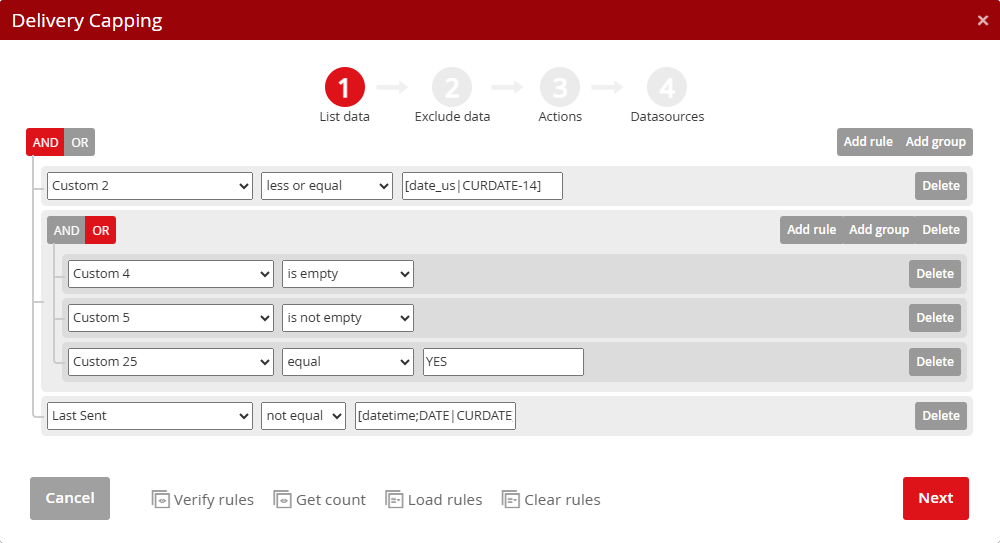
For many years, data has shown that personalized emails perform better than generic, bulk email campaigns. You can implement delivery capping using data from signups, and merge tags to pull in data from your list. However, there are even better ways to add that human touch to your email sends. Mailkit recommends doing an in-depth analysis to classify and familiarize yourself with your audience.
For example, imagine two customers who are shopping at your grocery store. The first is Jan, a vegetarian hippie who only shops a couple times a week from your e-shop. His orders are usually 900 czk. He is single and lives alone with his dog, for whom he also purchases food from your grocery store. Most of his orders are for pick up. The second is Gabriela, who manages an active household of 3 hungry children including her husband, and a cat. She purchases delivery orders from your store at least once a week, and the orders are closer to 1500 czk each time, with meat being a big part of the orders.
These are two very different customers, who purchase at different sending frequencies, price points, and have vastly different items they purchase. You could also draw conclusions about brand loyalty and potential customer churn based on this data. For example, Jan might have less brand loyalty than Gabriela, and could quite possibly be shopping elsewhere for many grocery items. Personalization of emails to both Jan and Gabriela means factoring in all data when considering how often to send mail, and tailoring your content to the recipients.
That said, if you want to target subscribers in this manner, it is important that you have the recipient’s consent to do so. Make sure you are familiar with the lawful bases for processing data.
In order of highest to lowest impact on your deliverability and reputation, list maintenance comes right after list collection. It is incredibly important how you build your list, but also how well you maintain that list. It is the same with a haircut, for example. A really amazing haircut still needs to be trimmed every 3-6 months to maintain its quality.
As such, you should be periodically conducting post-send analyses to keep your data source clean, healthy, and engaged. Keep an eye on your positive engagement and look for trends in opens, clicks, and revenue, especially on a per-domain basis. When completing these, pay attention to how your Mailkit engagement scores change over time. This is visible on a per-list basis in the account under Reports –> Recipients. It is also possible to see list growth, churn rate, and status on the Recipients Report page.

When it comes to analyzing non-deliverable mail, it is worth noting that bounces are handled automatically, and they are removed from sending if the bounce is permanent. The recipient will remain in the list, but only transactional email will be sent to them. Watch out for large spikes in bounce rate - this could indicate a list quality issue, or a delivery issue that needs attention.
To check for data quality issues in your list, look under the Deliverability Report in the Mailkit application. This will show you Feedback Loop (FBL) complaints, complaint statistics, your domain reputation report, DMARC reports (a paid feature), list hygiene history (which will show the types of unwanted recipients in your data sources), and your Deliverability history over time.
If you find yourself in a position where our Support team is asking you to clean your list, we can unofficially recommend doing so using third party services like Kickbox or ZeroBounce. For more tips on reputation repair, check out our blog post coming soon!
Stay tuned for Part 3 of this series, where we will discuss best practices for sending cadence, volume increases, and sending speed.
Let us know what your campaign objectives are and we'll create a plan that works for you.
Processing of information provided using this form is governed by our Privacy Policy.

A Czech emailing platform with its own infrastructure, that is a leader in international mailing distribution.


