
Deliverability 101 – Part 4
9 June, 2026

Cadence, volume increases, and sending speed
This guide is meant to educate Mailkit clients on Deliverability best practices, as well as give a comprehensive introduction into what factors impact deliverability. Hopefully by the end, you feel empowered to recognize and troubleshoot your own deliverability issues, and leave with a more complete understanding of what levers to pull to improve your inbox placement and engagement (all by following best practices!).
The guide is broken out into 4 parts, each with a different focus. Here you can review the previous 2 parts:
In Part 3, we’ll focus on best practices for sending cadence, volume increases, and sending speed.
As a recap, let’s talk about what deliverability is, by comparing it to delivery:
Delivery: The basic process of sending mail from a sender’s server to a receiver’s server.
Deliverability: This is more granular and provides perspective on where the mail actually ends up on the receiver’s server - the spam folder, a specific folder in the inbox, etc. - assuming it is not black holed or bounced.
Many factors influence deliverability, including domain reputation, authentication, list collection and maintenance, sending cadence, campaign content, subject line, and many other elements. That is why most of the time, deliverability does not boil down to just one change. It is the consistent, continual commitment to following best practices over time that ensures good deliverability and subscriber engagement.
When does reputation go cold? How often is too often, when it comes to sending? Unfortunately, there is no hard-and-fast rule here. The frequency of sending will always depend on your business model. Whether you are selling cars, underwear, or groceries, there will be a different frequency that makes sense for each business.
It is a difficult balance to strike - you do not want to bombard your audience, but you also do not want them to forget about your brand. This is where marketing specialists come in handy.
Frequency will also depend on how engaged your audience is. For example, you will send more often to your most engaged recipients with 4-5 engagement score, and less often to those with a score of 0-1, or even 2-3 (although it should be noted that the 2-3s in your list represent the average recipient).
That said, even to your most unengaged recipients, we recommend sending at least monthly – but ideally more regularly. However, keep an eye on this unengaged audience. If you have sent to them monthly for 6-12 months and they have not engaged or made a purchase during that time (depending on your product offerings and reasonable purchase frequency), it may be time to consider implementing a sunsetting policy.
Sunsetting is the process of identifying and either temporarily or permanently removing unengaged subscribers from sending after a period of no engagement. After identifying these subscribers, send them an email to find out if they are still interested in receiving email communications from you. This is a good time to ask for feedback, and ultimately communicate that a lack of response will mean they will be either temporarily or permanently unsubscribed from emails after X amount of time. Think of it as the classic Netflix prompt when you have left autoplay on for too long: “Are you still there?”
This might seem scary for marketers, but ultimately focusing your sending on subscribers who genuinely want to hear from you will strengthen your reputation and deliverability. When MBPs see you sending to a more engaged audience, they are more likely to place your mail in the various inbox folders, rather than in the dreaded spam folder.
And moreover, implementing a sunsetting policy is different than cleaning out your list - a sunsetting policy could very well be a pause, rather than a stop. It is all about maintaining a positive relationship with your recipients. Maybe they just need a break. For more tips on how to handle a sunsetting policy, check out this article from Mailjet.
There are a number of legitimate reasons why you might need to suddenly send a large amount of volume. One example that comes to mind is when you have to send a legally mandated email to your entire list all at once. That said, this kind of sending should be done intermittently, responsibly, and only when absolutely necessary.
This is because MBPs look for patterns when they analyze incoming mail, and one of those factors is sending volume and frequency. If they are accustomed to seeing 100 emails per hour at most from your domain, and all the sudden they see a 50k recipient campaign coming from the same domain, they may view it as suspicious and throttle or even bounce the mail, leading to a longer delivery time and a potential hit to your reputation.
It is always best practice to keep your sending consistent and predictable. And if you do have to increase your sending volume, start increasing by no more than 20% of the previous sending day’s volume. Setting daily sending limits on yourself is a great way to make sure you are ramping up volume responsibly and not overwhelming the MBPs to whom you are sending.
To help drive this point home, imagine these sending patterns as waves in the ocean, and MBPs as the ships sailing that ocean. Small waves are quite manageable, predictable, and safe. But if these ships are suddenly caught in turbulent waters with giant waves, the results can be deadly. These ships would surely do everything in their power to avoid such dangers, rather than sailing through them. Don’t let your mail be the turbulent waters they avoid!
Another way to improve your deliverability, especially when ramping up sending volume, is by changing your sending speed. This can be done easily using the “Schedule” option when sending a campaign. Using the drop down, you can choose how many emails you would like to send per minute, 5 minutes, 15 minutes, or per hour.
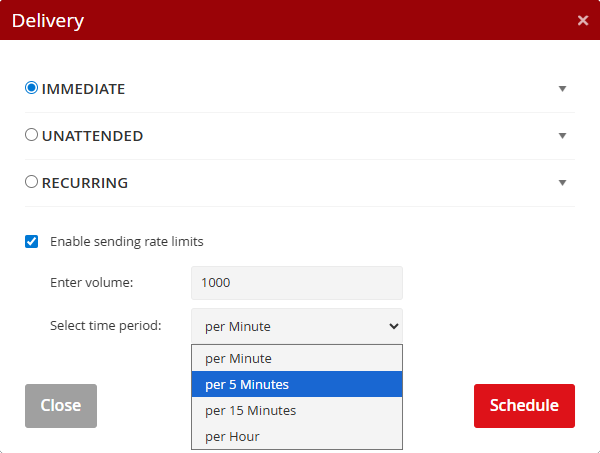
MBPs have outright communicated that, when sending large volumes of mail, it is always better to send mail more slowly using thresholds based on seconds or even minutes, rather than an hour.
For example, if you have to send a campaign to 20k recipients and you want it to take no more than 6 hours, you will likely see fewer deferrals and bounces by sending at a rate of 60 messages per minute, rather than sending 3600 messages per hour.
It is ultimately the same speed, but sending at a rate of 3600/hour means that all 3600 sends go out in the first minute, and then there is nothing for the remaining 59 minutes of the hour. Gradual sending is less offensive to MBPs who, as we mention in the above metaphor, prefer consistent, more manageable waves over time.
If you are enjoying this series so far, you are in luck! We have one more installment, coming soon. Stay tuned for Part 4!
Let us know what your campaign objectives are and we'll create a plan that works for you.
Processing of information provided using this form is governed by our Privacy Policy.

A Czech emailing platform with its own infrastructure, that is a leader in international mailing distribution.


