
Checklist: Setting Up for Success
26 October, 2026

This guide is meant to educate Mailkit clients on Deliverability best practices, as well as give a comprehensive introduction into what factors impact deliverability. Hopefully by the end, you feel empowered to recognize and troubleshoot your own deliverability issues, and leave with a more complete understanding of what levers to pull to improve your inbox placement and engagement (all by following best practices!).
The guide is broken out into 4 parts, each with a different focus. Here you can review the previous parts::
In Part 4, we are discussing Content, Design, Subject lines, and how to choose the right From email.
For the final time, let’s talk about what deliverability is, by comparing it to delivery:
Delivery: The basic process of sending mail from a sender’s server to a receiver’s server.
Deliverability: This is more granular and provides perspective on where the mail actually ends up on the receiver’s server - the spam folder, a specific folder in the inbox, etc. - assuming it is not black holed or bounced.
Many factors influence deliverability, including domain reputation, authentication, list collection and maintenance, sending cadence, campaign content, subject line, and many other elements. That is why most of the time, deliverability does not boil down to just one change. It is the consistent, continual commitment to following best practices over time that ensures good deliverability and subscriber engagement.
Your emails should have a purpose. Think: what value are you giving to your audience? Try to inspire engagement using polls, asking questions, encouraging readers to update their subscription preferences, or providing opportunities for conversations. A direct (positive) response to an email is an excellent signal for engagement, and will ultimately bolster deliverability. When possible, make sure there is a call to action, with the idea being to drive traffic to your website, blog, etc.
When it comes to link shorteners, our official recommendation is that it is best to avoid them completely. Because link shorteners redirect a click, these can look spammy to receivers - because they often are! It is best to use the final link in the HTML of the email, and hyperlink text as opposed to using link shorteners.
Image-to-text ratio: The golden ratio here is 20:80, with more text than images. However, be careful using images with text in them. These can sometimes be used for malicious purposes, and are known to trigger spam filters. And please, do not send a campaign that is just one giant, single image. You can expect to have very poor deliverability if you do.
Email size limitations are often overlooked when designing content, even by seasoned marketers. I can think of at least five big senders in my inbox right now, all of whom have their content clipped by Gmail because their emails are too big. Why is this a problem? Opens are often collected using a tiny tracking pixel that is stored at the bottom of every email. If the bottom of the email ends up being clipped, your opens are not tracked and your engagement appears lower than it is. This is especially true at Gmail - so if you are seeing your open rate at Gmail in the low single digits, chances are your mail is getting clipped.
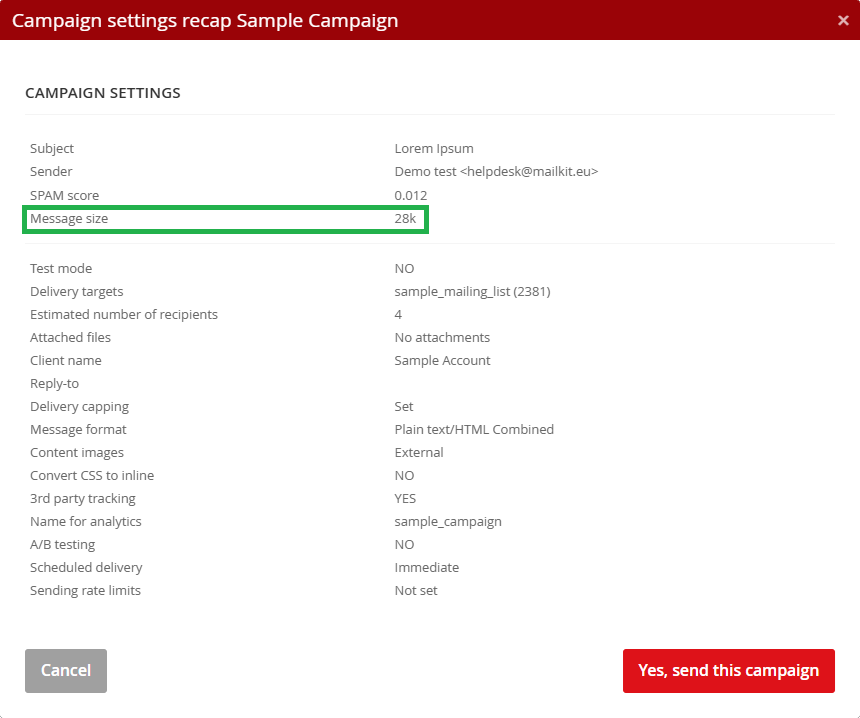
For Google, any campaigns with a size greater than 112 kB will be clipped. In Mailkit, we never send emails that are greater than 200 kB. This message size is visible from inside the app, when the campaign is being scheduled or sent. Note: this size in Mailkit is an estimate, and depending on the number of links in the campaign (if tracking is enabled on the campaign), it may increase after sending. Therefore, it is best to err on the side of smaller emails, if possible.
Are the emails attractive and engaging? When it comes to design tips, there are too many to list. Here are some Design tips from a trusted blog. And test, test, test! Always test your campaigns before sending them to your entire audience.
You may have heard warnings about using emojis, capitalization, or punctuation in subject lines. Believe it or not, these are all acceptable - in moderation. But too much of anything is often a bad idea, so try not to overdo it.
Another factor to consider when crafting the perfect subject is actually the length. This is for practical reasons. A subject line that is too long runs the risk of truncation or obfuscation depending on the device being used to read the email. Keep your subject lines short, relevant, and to the point, and when in doubt, use A/B testing to see what works best for your audience.
Where possible, use personalization in the subject line and preheader text, and avoid click bait or misleading subject lines. You may get an open, but you may also get an immediate angry unsubscribe or spam complaint, too. For more tips, check out this Kickbox article.
Avoid noreply@ aliases, or any email that does not accept email responses. Think about it this way: if a recipient wants to respond to one of your emails with a question or concern, how would they do so? Remember, when someone responds to your email, this is typically a very strong signal of engagement, and it is a factor when Mailbox Providers (MBPs) are deciding where to place your email. By using a noreply@ alias, you are preventing that engagement from happening.
When choosing the sending name and email address from which to send mail, this combination should make sense considering the content, source, and purpose of the email. As an example, let’s look at the from: name James Smith <news@mailkit.com>
MBPs will use a variety of factors to determine the benevolence of a campaign, and they may see this combination and suspect that it is an attempt to evade the bulk folder and appear as a personal message so it will land in the primary folder. The lesson: What originally was an attempt to land in the primary folder could very well cause your mail to end up in spam.
And finally, if you are sending both marketing and transactional email, it makes sense to use different sending emails for each mail stream. We typically recommend using the same organizational domain (example.com) with two subdomains to separate out the traffic. Here is an example below:
The subdomains order and newsletter make sense for the different mail streams, while maintaining the shared brand identity of example.com across both subdomains. Sending both marketing and transactional together over the same domain or subdomain can and will compromise the deliverability of your very wanted transactional mail like order confirmation or password reset emails, rather than boosting the deliverability of marketing mail.
To drive this home, imagine that instead of utilizing distinctive subdomains for each stream, you identified them using different colors - perhaps purple for marketing, and yellow for transactional. By sending to both streams via the same channel, the colors end up mixing into brown, which doesn’t help MBPs distinguish either clearly, and creates more work for them. Ultimately this lack of distinction may mean MBPs erroneously place your transactional mail in the Promotions tab, where it is more likely to be buried among the promotional marketing mail.
And on the subject of distinguishing marketing vs transactional mail, this deserves a note: anything that promotes a product or service is a marketing message, regardless of whether or not that email is selling something. Here is a good way to think about it: if it is something that can be indiscriminately sent to your entire audience, it is going to be marketing rather than transactional. You wouldn’t send the same password reset or order confirmation email to your entire audience - that would be a security issue and cause for alarm. As such, these are purely transactional emails. That said, exceptions here are made for legally mandated email, such as a change of ToS email, or vital interest emails.
We hope that this guide gives you the tools you need to succeed in your email marketing endeavors.
Despite the length of this guide, there are certainly things we did not include. If you are wondering where to turn for reliable deliverability information (outside of our own Mailkit blog), we wanted to include some blogs, websites, and online tools that could help you on your journey.
As always, thanks for reading and don’t hesitate to reach out with additional questions!
Keep an eye out for our Reputation Repair guide, which you can expect in the coming months.
Let us know what your campaign objectives are and we'll create a plan that works for you.
Processing of information provided using this form is governed by our Privacy Policy.

A Czech emailing platform with its own infrastructure, that is a leader in international mailing distribution.


